Free Slate account Converts your slides Share or publish anywhere
How it works
Your Canva presentation is the source content. Slate is where the course is built, refined, and published.
1
Create your free Slate account
A free Slate account is required to use the Canva app. Sign up takes a minute. No credit card.
2
Configure in Canva
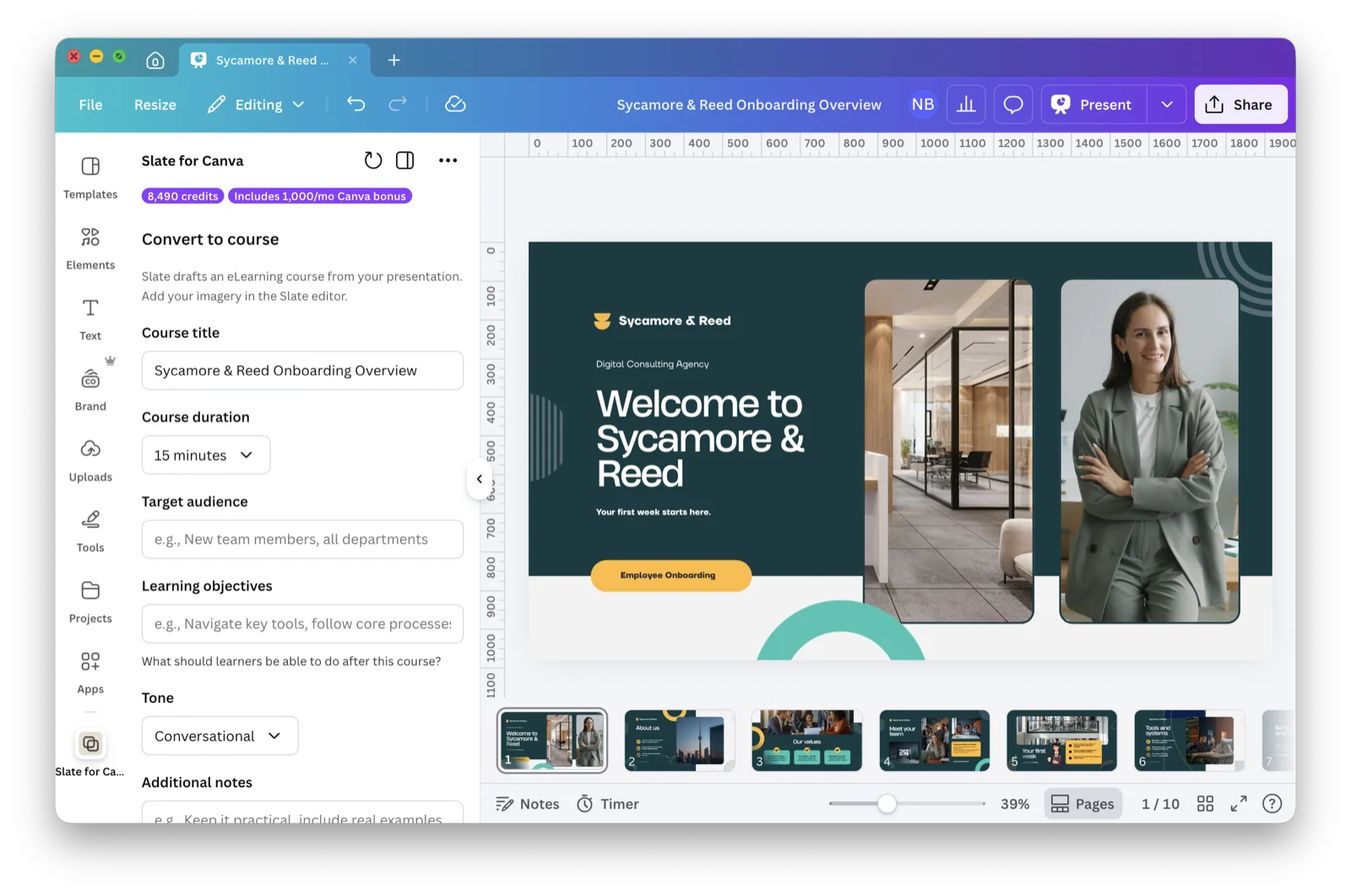
Open any presentation and launch the Slate side panel. Set your audience, course duration, learning objectives, and tone.
3
Generate, refine, and publish
Slate's AI builds a structured, interactive course from your slides. Refine in Slate, then share it via link or publish to any training platform.
What the Canva app can do
AI generates the course. You control the learning design.
AI-powered course generation
AI analyzes your presentation content and generates structured lessons with interactions, knowledge checks, and proper learning flow.
Bonus AI credits
Course authors on the Free plan receive 1,000 one-time bonus credits (never expire) when connecting Canva. Course authors on Standard and Pro plans get 1,000 extra credits every month.
Configurable output
Set course duration, target audience, learning objectives, tone, and whether to include an assessment. The AI adapts the output to your specifications.
Theme support
Your Slate theme preset (colours, fonts, and logo) is applied automatically. Every course matches your organization's visual identity.
Multi-language ready
Draft your courses in any of 15 languages. On Standard and above, translate them with AI and publish as one multi-language SCORM package, with no separate uploads per language.
Works with any training platform
Export as SCORM 1.2, SCORM 2004, xAPI, cmi5, or standalone HTML. Compatible with any LMS that supports these standards.
Built for teams that already use Canva
Whether you're generating courses from existing decks or building new training, the Slate Canva app fits your workflow.
Instructional designers
Use your Canva storyboards and design mockups as source material for fully interactive courses without switching tools or rebuilding from scratch.
L&D teams
Let subject matter experts create content in Canva. Generate structured training courses from their presentations with consistent quality.
Training companies
Scale course production by generating branded eLearning courses from client presentations. Faster turnaround, lower production cost.
Educators
Transform lecture slides and classroom materials into self-paced online courses with built-in assessments and progress tracking.
Frequently asked questions
Yes. That’s exactly what the Canva app is built for. Take the deck you already use for instructor-led or classroom training, and Slate’s AI rebuilds it as a structured, self-paced web-based training (WBT) module, with the interactions, knowledge checks, and assessments a live session can’t carry on its own. What you get is a draft built on learning best practices, ready for you to edit and personalize in Slate before you export to SCORM, xAPI, cmi5, or standalone HTML and deliver it through any LMS.
Yes. Slate generates a structured course you can refine and split into short, focused lessons in the editor, and the published courses are mobile-friendly, so the material can be worked through in short sessions rather than one long sitting. New to short-form training? Start with our microlearning guide.
A single workshop or classroom session fades fast: the forgetting curve means most of what was covered slips away within days. Reinforcement is what counters that. Turning the same presentation into a structured course gives you a follow-up to the live session, with knowledge checks that prompt learners to recall what they covered. That kind of retrieval practice is what moves learning into long-term memory and makes the training stick.
Yes. A free Slate account is required to use the Canva app. You can sign in or create one when you first launch the app inside Canva. It takes a minute and no credit card is required. Your generated course lands in your Slate dashboard, where you can refine and publish it.
Not yet. Currently, the app reads your slide text and structure, then generates an interactive course from that content. Images and media from your presentation are not transferred. The generated course includes placeholder images that you can replace inside Slate. Media transfer is on our roadmap.
Yes. Every Slate-generated draft is structured around Gagné's Nine Events of Instruction, Mayer's Multimedia Principles, and constructive alignment for assessments. From there, you can refine every section, interaction, and assessment in Slate's editor to match your audience, voice, and learning objectives. Read more in how Slate's AI features are built for online learning.
Course generation uses AI credits. Course authors on the Free plan receive a one-time bonus of 1,000 credits when connecting Canva. Course authors on Standard and Pro plans get an extra 1,000 credits per month on top of their existing allowance for as long as the app is connected.
All of them, including Free. Free gives you up to 5 courses and 1,500 AI credits per month. Standard (10,000 credits/month) and Pro (30,000 credits/month) add more courses and a larger monthly credit allowance.
Yes. The course opens in Slate's full editor where you can rearrange content, add interactions, attach media, configure assessments, and export to your LMS. AI translation to other languages is available on Standard and above.
Slate drafts courses in 15 languages. Set your default course language in your Slate profile and the AI will draft in that language. On Standard and above, you can also translate generated courses in Slate and export them as a single multi-language SCORM package.
Turn your presentation into a course
Open Slate for Canva in Canva, then sign in or create a free Slate account to generate, refine, and publish your course.
 +
+